IAM, S3, CloudTrail, and GuardDuty
PROJECTSPROJECTS
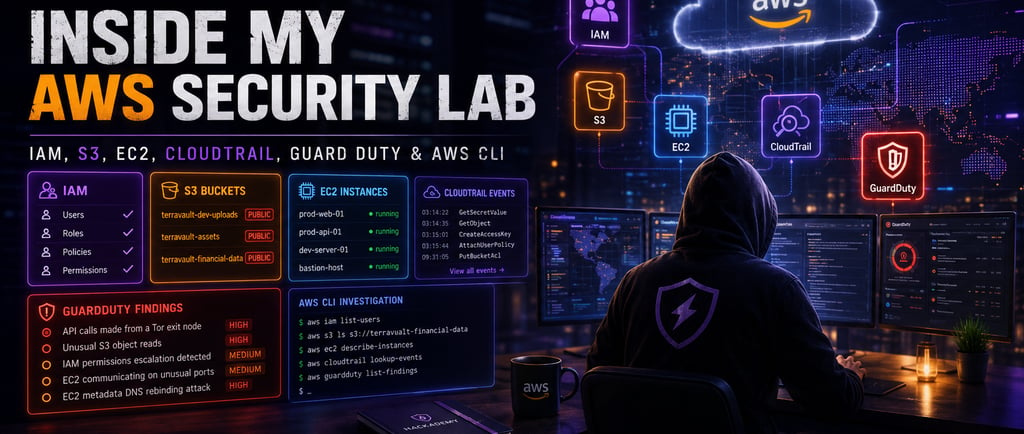
I created this AWS Security Lab to help students understand common cloud security risks in a practical way. A lot of beginners hear about cloud security, IAM permissions, S3 buckets, EC2 instances, CloudTrail, GuardDuty, and privilege escalation, but they do not always understand how these things connect together inside a real cloud environment.
The lab is designed like an AWS-style security console for Hackademy. It uses a fictional AWS account in the us-east-1 region, and the student works as the analyst reviewing the environment. My goal was to make the lab feel like a real cloud security review where students can inspect identities, storage, compute resources, logs, alerts, and CLI output.
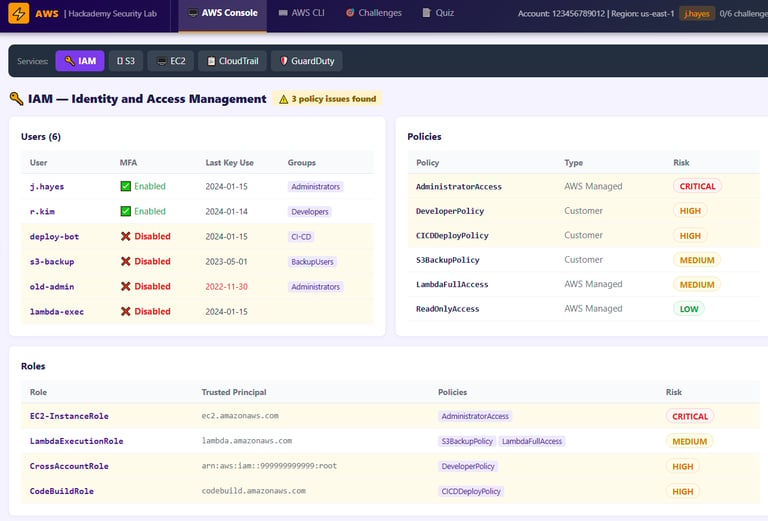
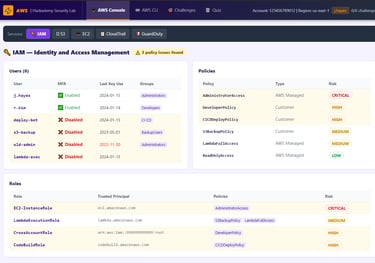
The first screenshot shows the IAM section, which stands for Identity and Access Management. IAM is one of the most important parts of AWS security because it controls who can access what inside the cloud account.
In this section, students can see users such as j.hayes, r.kim, deploy-bot, s3-backup, old-admin, and lambda-exec. Some users have MFA enabled, while others have MFA disabled. This is important because MFA helps protect accounts even if passwords or access keys are stolen.
The screenshot also shows policies such as AdministratorAccess, DeveloperPolicy, CICDDeployPolicy, S3BackupPolicy, LambdaFullAccess, and ReadOnlyAccess. The risk ratings help students understand that not all policies carry the same danger. A read-only policy may be low risk, but AdministratorAccess is critical because it can allow full control of the account.
The roles section is also important. Roles like EC2-InstanceRole, LambdaExecutionRole, CrossAccountRole, and CodeBuildRole show how AWS services can receive permissions. This teaches students that cloud identity is not only about human users. Applications, servers, pipelines, and services also have identities, and those identities can become dangerous if they are overprivileged.
The main lesson from this screenshot is that cloud security starts with identity. If IAM is misconfigured, attackers do not need to break into every service one by one. They can abuse permissions and move through the account.
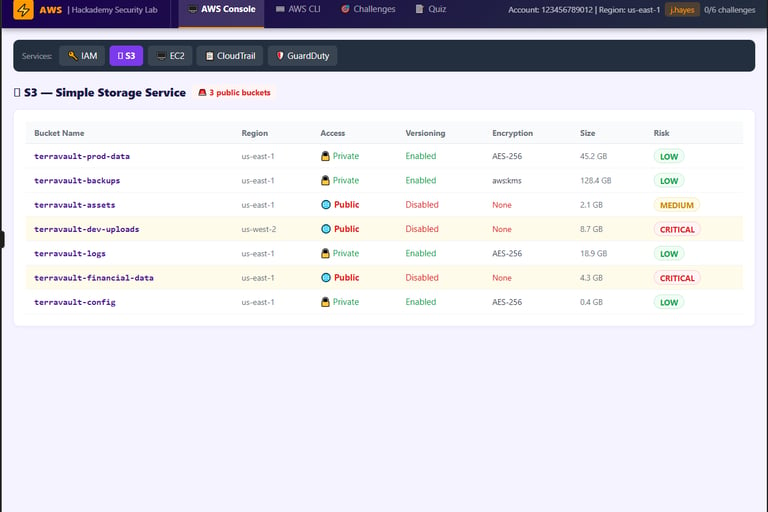
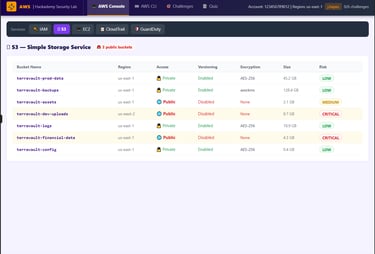
The second screenshot shows the S3 section. S3 is used for object storage, but it is also one of the most common places where companies accidentally expose sensitive data.
In this part of the lab, students can see buckets such as terravault-prod-data, terravault-backups, terravault-assets, terravault-dev-uploads, terravault-logs, terravault-financial-data, and terravault-config.
Some buckets are private, encrypted, and versioning is enabled. Those are better security practices. But some buckets are public, unencrypted, and versioning is disabled. That is a serious issue, especially when the bucket name suggests that it may contain financial data or development uploads.
The terravault-financial-data bucket is especially important because it is public, unencrypted, and marked critical. This teaches students how dangerous a public S3 bucket can be when it contains sensitive business information. The terravault-dev-uploads bucket is also critical because development upload buckets are often forgotten, poorly monitored, or used to store files temporarily.
This section teaches that S3 security is not just about whether a bucket exists. Students need to check access level, encryption, versioning, bucket purpose, and the type of data that may be stored inside.
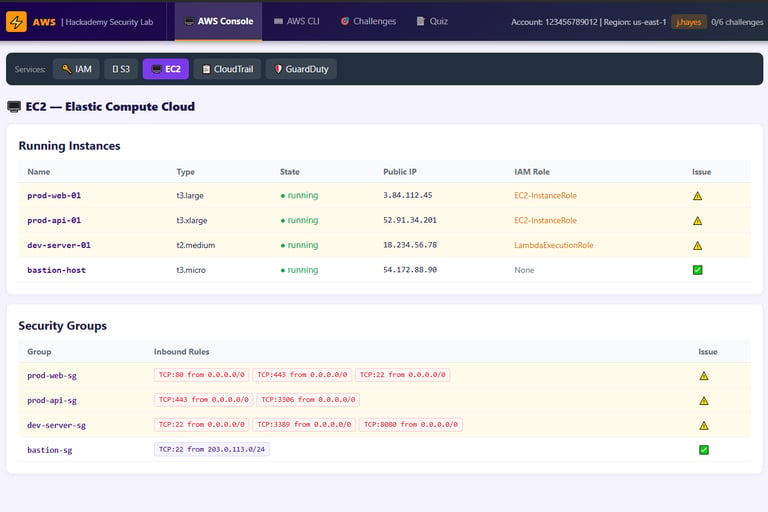
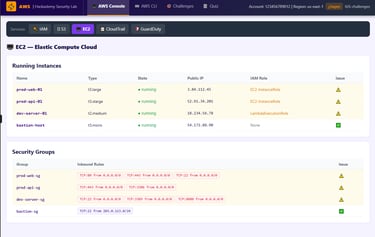
The third screenshot shows the EC2 section. EC2 represents cloud servers running inside the AWS environment. In this lab, students can see instances like prod-web-01, prod-api-01, dev-server-01, and bastion-host.
The first thing students should notice is that some instances have public IP addresses and attached IAM roles. That matters because if an exposed EC2 instance is compromised, the attacker may try to use the attached role to access other AWS services.
The security group section is also very important. A security group works like a cloud firewall. It controls what inbound traffic is allowed to reach an instance. In the screenshot, some groups allow risky access from 0.0.0.0/0, meaning anyone on the internet can attempt to connect.
For example, allowing SSH on port 22 from the whole internet is risky. Allowing RDP on port 3389 from the whole internet is also risky. Exposing database ports like 3306 publicly is even more dangerous because databases should not usually be open to everyone.
The bastion security group is shown as safer because it limits SSH access to a specific IP range instead of allowing the entire internet. This teaches students the difference between controlled access and dangerous open access.
The main lesson from this section is that cloud network exposure matters. A secure instance can become risky if the security group is too open.
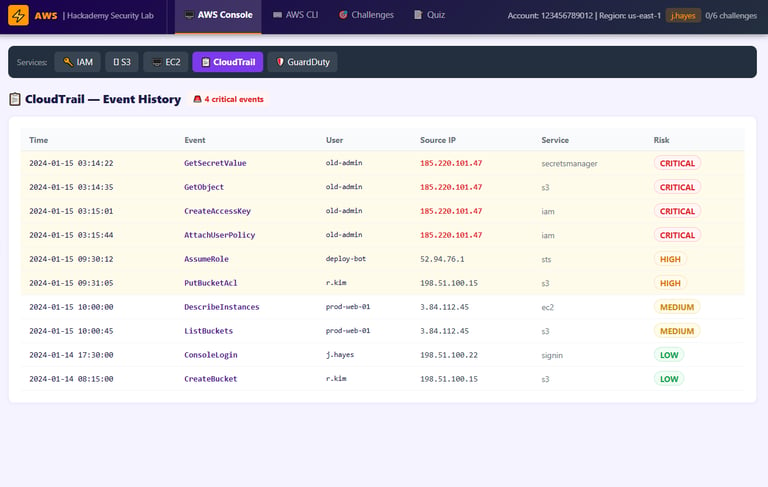
The fourth screenshot shows CloudTrail. CloudTrail is one of the most important tools for cloud investigation because it records API activity inside the AWS account.
In this lab, CloudTrail shows events like GetSecretValue, GetObject, CreateAccessKey, AttachUserPolicy, AssumeRole, PutBucketAcl, DescribeInstances, ListBuckets, and ConsoleLogin.
This section teaches students how to follow an attack chain using logs. For example, if an old admin account calls GetSecretValue, then accesses S3 objects, then creates access keys, then attaches a policy, that is a serious sequence. Each event by itself is useful, but the timeline is what tells the real story.
CloudTrail also shows the user, source IP, service, time, and risk level. This is important because analysts need to know who performed the action, where it came from, what service was affected, and whether the activity was normal or suspicious.
The main lesson here is that CloudTrail is the memory of the AWS account. If something happens in AWS, CloudTrail is usually one of the first places a defender should check.
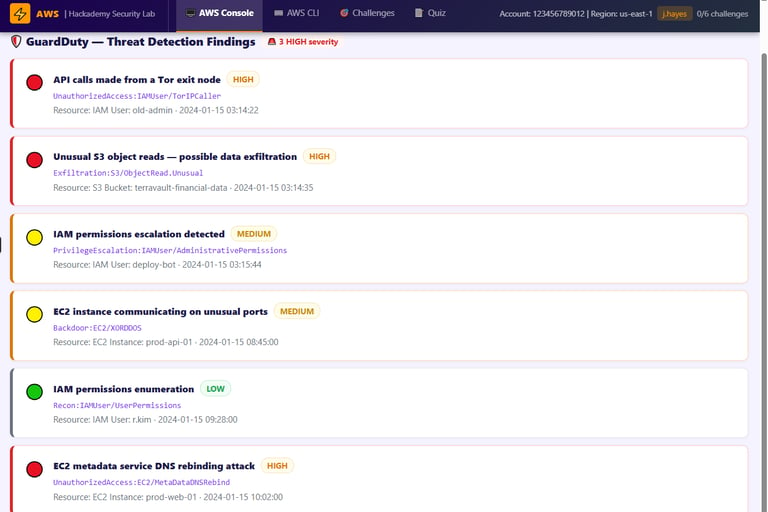
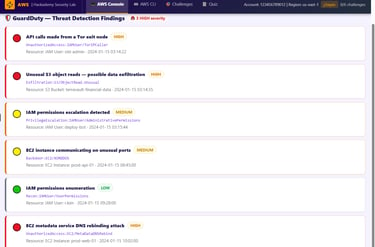
The fifth screenshot shows GuardDuty findings. GuardDuty is used to detect suspicious activity in AWS based on logs and threat intelligence.
In this lab, students can see findings like API calls made from a Tor exit node, unusual S3 object reads, IAM permissions escalation, EC2 communicating on unusual ports, IAM permissions enumeration, and EC2 metadata service DNS rebinding.
This section teaches students how to triage cloud alerts. A GuardDuty finding is not just something to click and ignore. The analyst has to understand the resource, the technique, the severity, and what action should be taken.
For example, API calls from a Tor exit node are suspicious because legitimate administrators usually do not manage AWS from Tor infrastructure. Unusual S3 object reads may suggest data exfiltration. IAM privilege escalation means someone may be trying to gain more permissions. Metadata service DNS rebinding is dangerous because it may allow an attacker to steal temporary credentials from an EC2 instance role.
The main lesson from this section is that GuardDuty helps detect the behavior, but the analyst still needs to investigate and explain the impact.
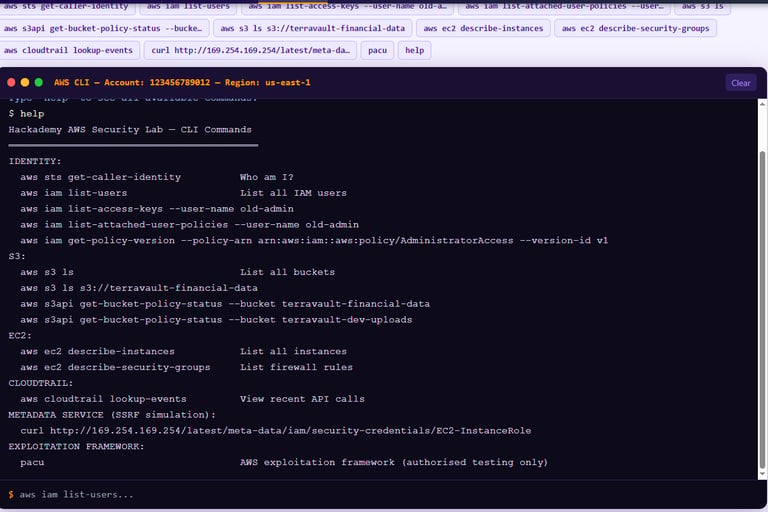
The sixth screenshot shows the AWS CLI section. I added this because cloud security students should understand both the console and command-line investigation.
The lab includes commands such as aws sts get-caller-identity, aws iam list-users, aws iam list-access-keys, aws iam list-attached-user-policies, aws s3 ls, aws s3 ls s3://terravault-financial-data, aws s3api get-bucket-policy-status, aws ec2 describe-instances, aws ec2 describe-security-groups, and aws cloudtrail lookup-events.
These commands teach students how to verify what they see in the console. For example, aws sts get-caller-identity helps confirm who the current caller is. aws iam list-users shows IAM users. aws s3 ls lists buckets. aws ec2 describe-security-groups helps review firewall rules. aws cloudtrail lookup-events helps investigate API activity.
The CLI also includes a metadata service check using curl against the EC2 metadata service. This teaches students why instance metadata security matters and why protections like IMDSv2 are important.
The main lesson here is that good cloud security analysts should not only rely on dashboards. They should also know how to query the environment directly.
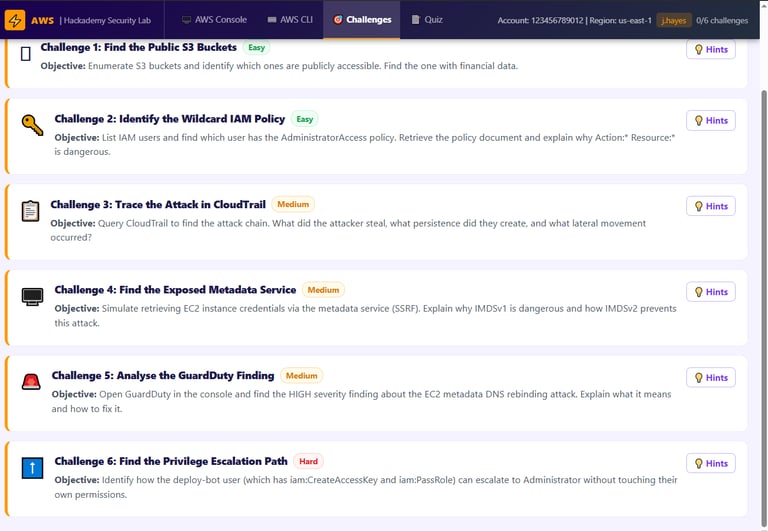
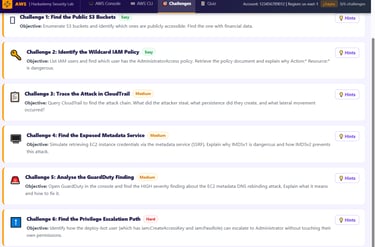
The seventh screenshot shows the challenge section. I added challenges so students can apply what they learned instead of only reading the screen.
The first challenge asks students to find public S3 buckets. This teaches storage exposure review.
The second challenge asks students to identify a wildcard IAM policy. This teaches why Action:* and Resource:* are dangerous when used carelessly.
The third challenge asks students to trace the attack in CloudTrail. This teaches timeline analysis and investigation.
The fourth challenge asks students to find the exposed metadata service. This teaches SSRF-style risk and why metadata credentials must be protected.
The fifth challenge asks students to analyze a GuardDuty finding. This teaches alert triage.
The sixth challenge asks students to find a privilege escalation path involving the deploy-bot user. This teaches how permissions like iam:CreateAccessKey and iam:PassRole can become dangerous when chained together.
This challenge section is important because it turns the lab into an active learning experience. Students are not just looking at cloud services. They are investigating, making decisions, and explaining findings.
Overall, this AWS Security Lab helped me create a practical way to teach cloud security. The lab connects IAM, S3, EC2, CloudTrail, GuardDuty, CLI investigation, and privilege escalation into one learning environment.
The biggest lesson from this project is that AWS security is about understanding relationships. A public bucket is bad, but it becomes worse if it holds financial data. An EC2 instance is normal, but it becomes risky if it has a public IP, open ports, and an overpowered IAM role. A CloudTrail event is just a log, but multiple events together can reveal an attack chain.
This project is important for my portfolio because it shows that I am not only learning cloud security theory. I am also creating hands-on labs that help students understand real cloud security problems in a clear and practical way.
The lab teaches students to think like cloud defenders: review identity, inspect storage, check network exposure, investigate logs, analyze alerts, verify with CLI commands, and explain the risk in a way that makes sense.